" transform="translate(0 6.875)" width="14px"/><path d="M 0 14 L 0 0" fill="transparent" height="14px" id="kdPOuS2o3" stroke-dasharray="" stroke-linecap="butt" stroke-linejoin="miter" stroke-miterlimit="10" stroke-width="2" stroke="rgb(255, 255, 255)" transform="translate(6.875 0)" width="1px"/></svg>)
Overview
Summary
BodyBuddy was a school project at Langara College’s Web and Mobile Design and Development postgraduate diploma program for Fall 2024, where team Cre8 worked collaboratively through Agile framework to design and develop an MVP web application.

The Challenge
How do we help users who have a desire to improve their health and fitness but don’t know where to begin, or are afraid that incorrect movements may cause injury?
The Solution
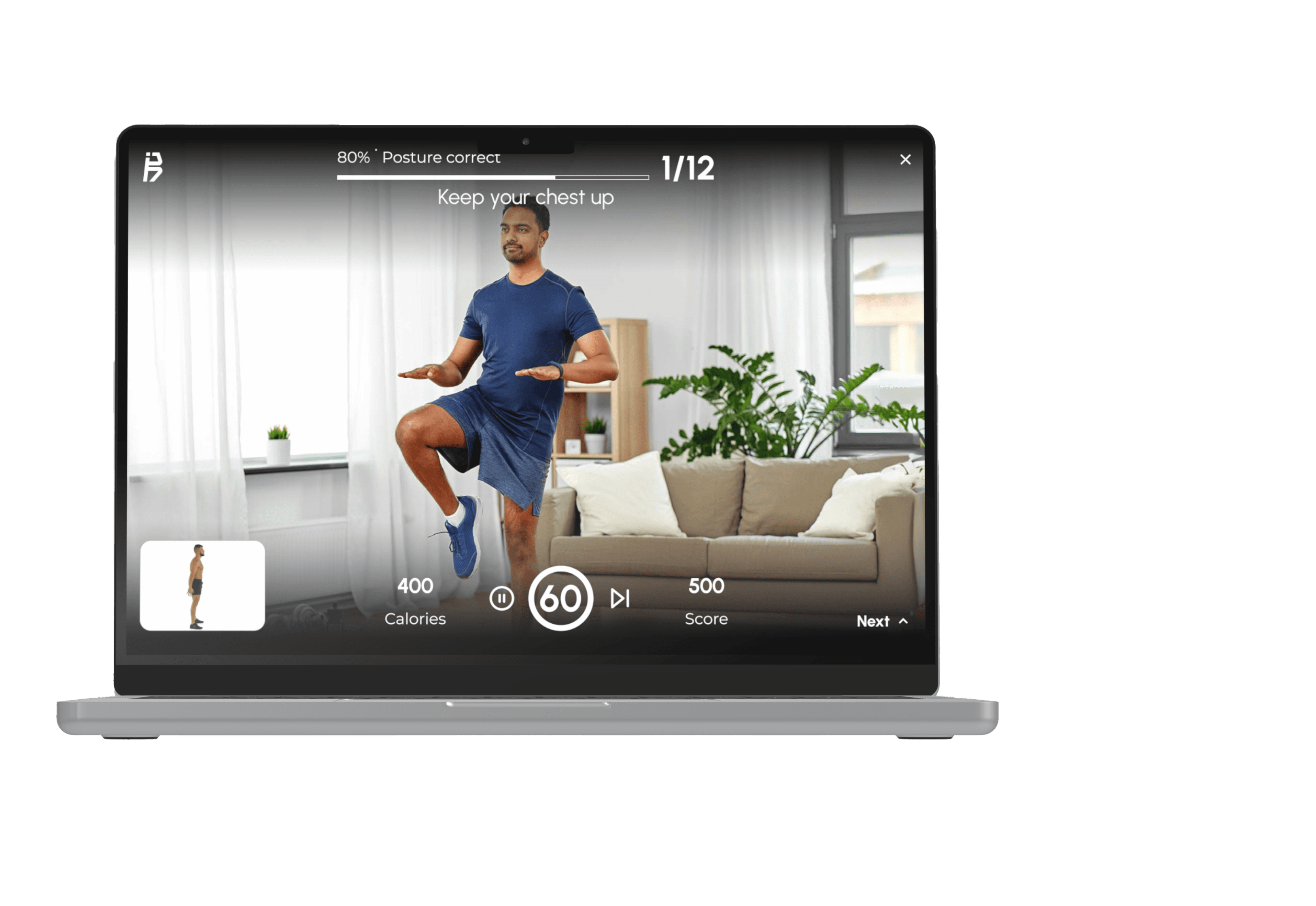
By using motion tracking technology, the app provides real-time feedback to correct form, helping users improve posture and avoid injury. To make exercise more accessible and approachable for people, BodyBuddy offers personalized workout plans that adapt to each user’s progress and goals.
With features like an exercise demo library and visualized progress tracking, BodyBuddy makes it easy for users to stay motivated and on track, offering a comfortable and approachable way to get fit at home.
Motion-Guided Workouts
Exercise safely and effectively through AI-powered motion tracking and real-time audio/visual feedback.
Personalized Exercise Plan
Follow a tailor-made program which grows along with you at any stage of your exercise journey.
Fitness Growth Tracking
Track your fitness progress and goal achievements through an interactive chart and badge collection.
Demo
Empathize
Design Thinking Workshop
In the initial stage of the design process, our main goal was to expand our understanding of our target demographic in order to build more accurate mental models. The participants were our designers and developers, while I was the facilitator. I found appropriate templates which fit the plan our design team agreed upon for this workshop.
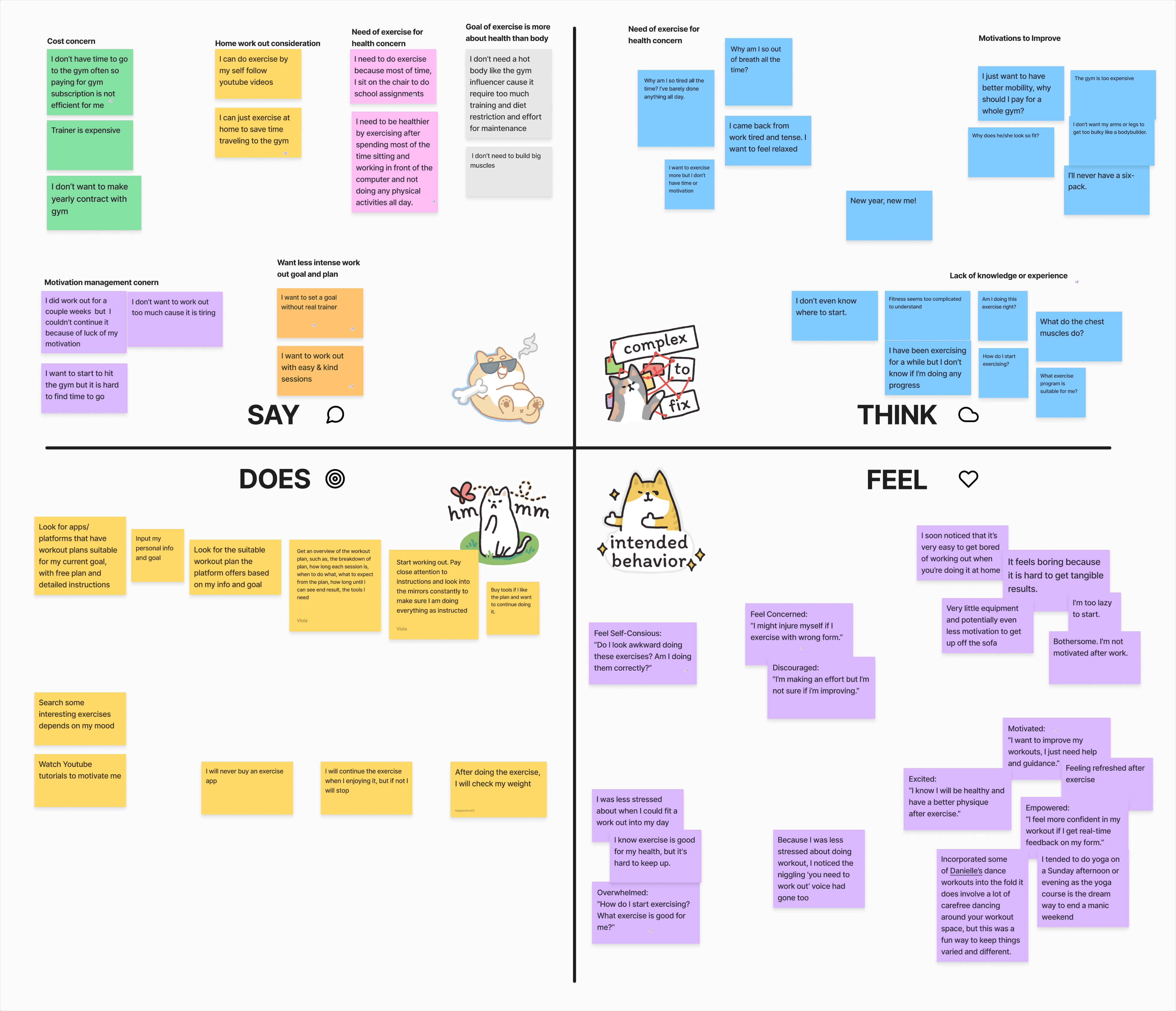
Empathy Mapping
In the initial stage of the design process, our main goal was to expand our understanding of our target demographic in order to build more accurate mental models.
The participants were our designers and developers, while I was the facilitator. I found appropriate templates which fit the plan our design team agreed upon for this workshop.
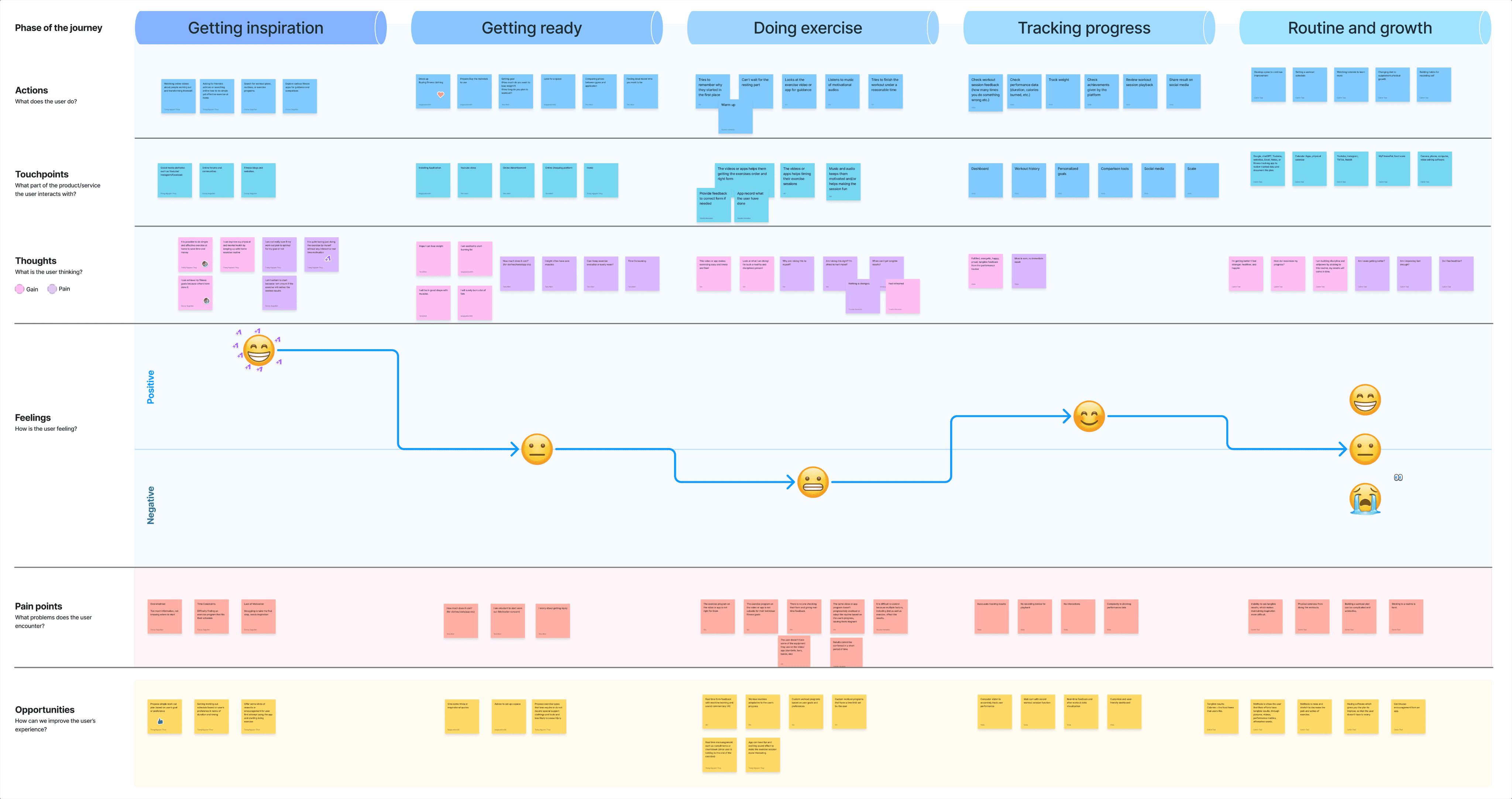
User Journey Mapping
After grouping similar post-it notes on the empathy map into different categories, we started to get a clearer picture of various motivations and frustrations potential users may have. Through a user journey mapping exercise, we sought to build a deeper understanding of the pain points and touch points our users may phase throughout their journey, as well as the opportunities that could potentially help them overcome those frustrations.
Personas
After building a more comprehensive mental model of our potential users through the user journey mapping exercise, we were able to distinguish three different persona types: a power user, an average user, and a casual user.
Power User
Jane Lee
Age:
Occupation:
Location:
34
Marketing Coordinator
Vancouver
Jane is a busy marketing professional. She wants to have a healthy lifestyle, but she struggles to find time to do so. Even when she finds a way to start, she struggles to keep the habit going. Jane prefers working out at home, where she can enjoy the flexibility of her schedule. She also likes following guided instructions, to avoid injury, and ensure she’s doing the exercises correctly.

Frustrations
Feels unsure about her workout techniques and sometimes experiences discomfort due to improper form.
She is often discouraged by a lack of immediate feedback or progress tracking, leading to inconsistent fitness efforts.
Time limitations due to work and family responsibilities.
Goals
Establish a consistent workout routine that she can follow without needing to go to a gym.
Stay healthy and avoid injuries while working out.
Build stamina and strength while tracking her progress over time.
Average User
Jonathon Williams
Age:
Occupation:
Location:
63
Retiree
Calgary
Jonathon is committed to improving his physical and mental well-being. With a focus on safety and enjoyment, he is eager to discover low-impact home exercise routines that he can incorporate into his daily life. He believes in the power of regular exercise to build strength and boost overall health.

Frustrations
Doesn’t want to invest in exercise equipment.
Not willing to participate in high intensity exerciseTime limitations due to work and family responsibilities.
Lacks exercise knowledge, so not sure where to start
Goals
Have a low-impact exercise plan tailored for him.
Need some easy-to-follow instructions for workout.
Avoid injury and consider physical limitations.
Increase mobility and flexibility so he can reduce stiffness and improve movement.
Casual User
Sophia Smith
Age:
Occupation:
Location:
21
College Student
Edmonton
Sarah is a 21-year-old college student who wants to get fit and healthy, but doesn’t have the time or money to invest in a gym membership or a personal trainer. She wants fitness to be a part of her identity, but first she has to start building a regular exercise habit from the comfort of home.

Frustrations
She has limited space, due to her college environment.
She has limited time to do exercise workout because of school commitments.
Her budget is limited, so she can’t afford a gym membership or personal trainer
Goals
Build a habit of burning calories every day.
Get the most out of exercise with the least amount of resources necessary.
Take the first steps, in order to make fitness part of her identity.
Competitor Analysis
With the findings from our design thinking workshop, we were able to come up with 3 main features to help our users. We gathered research of competitors with similar product offerings to see how we could stand out in this competitive industry.





Workout with Motion Tracking
Exercise Video Library
Tracking Workout Progress
Personalized Workout Plan
Record Workout Sessions
Define + Ideate
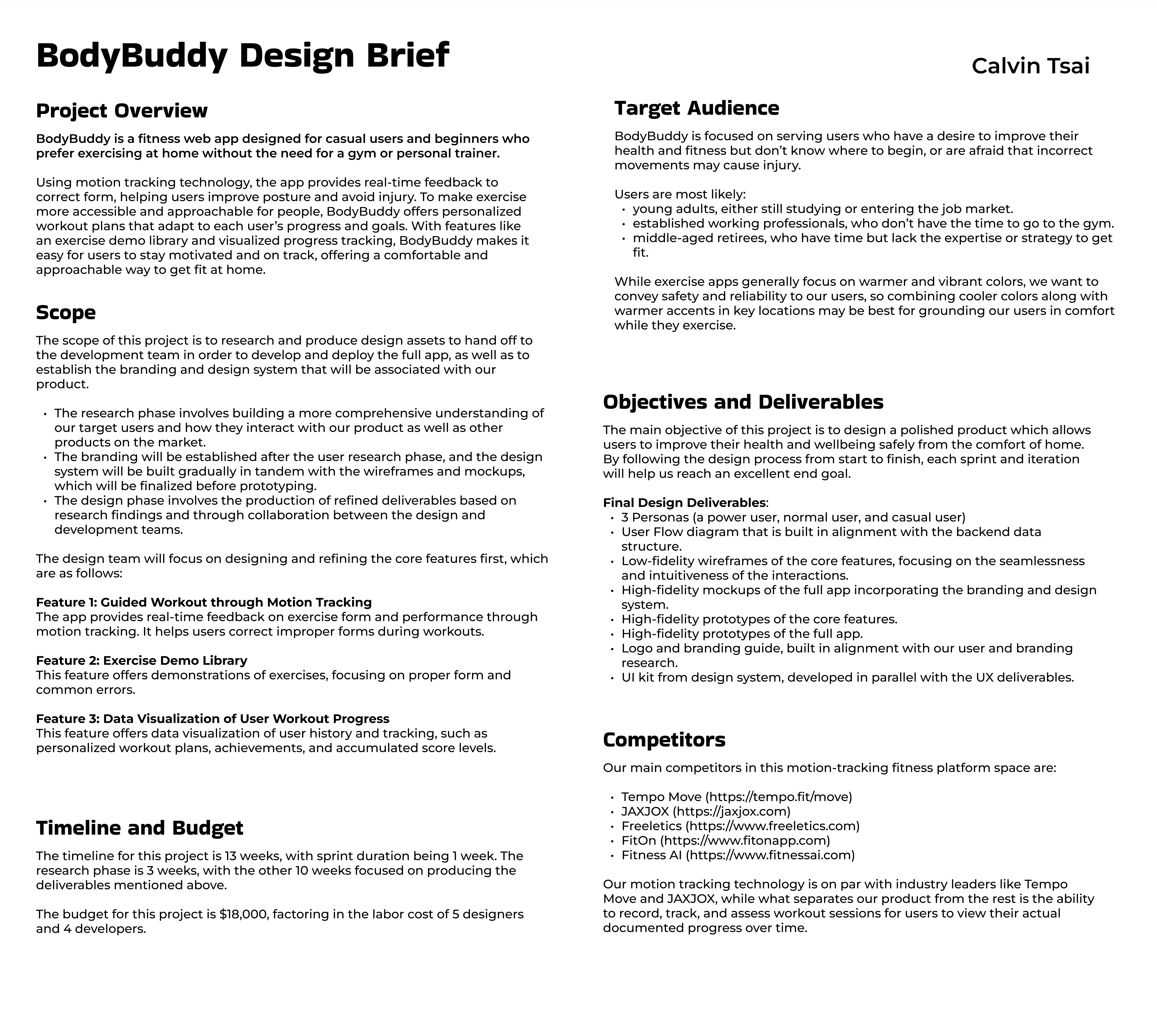
Design Brief
Each designer devised a design brief to gauge the context and requirements for the project. It helped our team to align on the scope, the target audience, and the objectives and deliverables to help us achieve our goals.
Mood Board
Each designer also created a mood board, which helped us to gain a greater understanding of the stylistic inspiration that would best represent BodyBuddy.
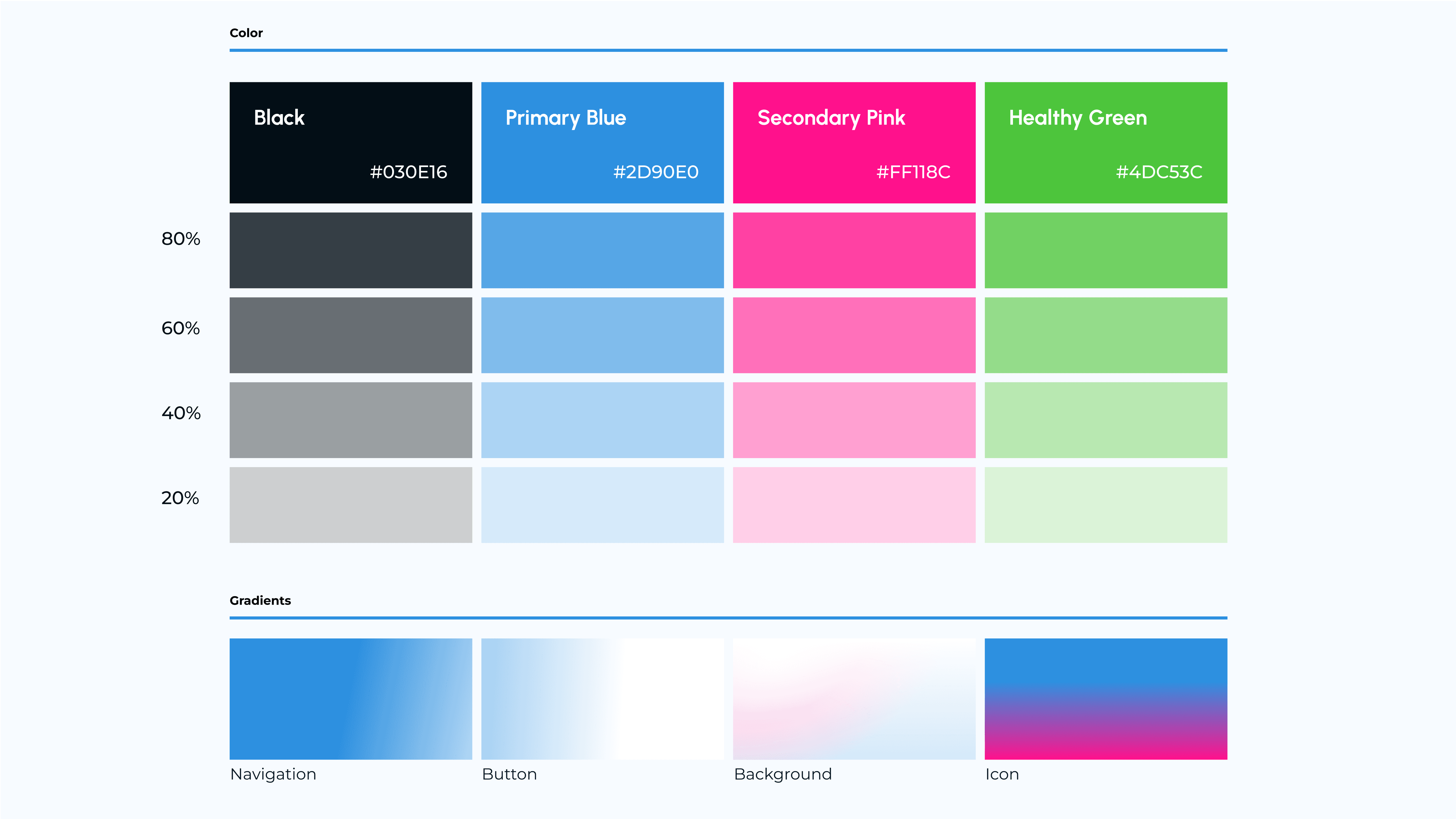
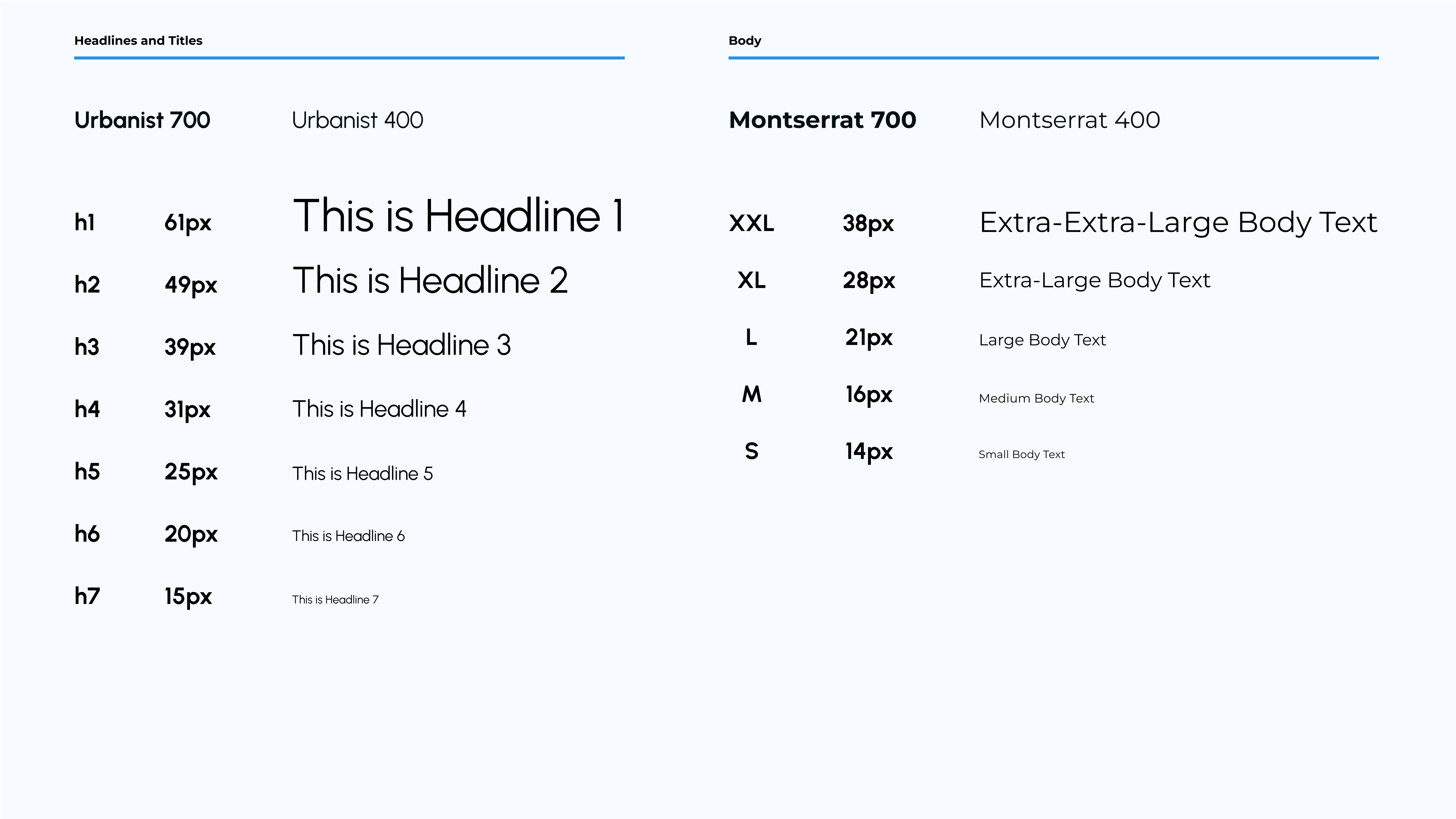
After alignment with the team, we decided on our brand adjectives, color palette, typography, and general guidelines for UI element and image choices.


User Flow
The design team first created the user flow to lay out the blueprint for how each of the features interact. It was a critical to understand the interaction between the training feature, the learning feature, and the exercise screens, as well as how user history would be tracked and recorded in the dashboard and profile.
Full User Flow
With the Exercise Screen flow being connected to both the Training and Learning flows, our team felt this was the optimal approach to both streamline the user experience and allow the user to get the most value out of our product’s core functionality.

Training Feature User Flow
I was mainly responsible for constructing the flow for the Training feature, which was the portal for users to either continue with their personalized program, or choose a premade program which was unrelated to their custom program.
The main priority for me when designing this flow was to allow the user to be able to receive all the information they would need prior to engaging in exercise, as well as the ability to learn or refresh their memory of a particular movement in order to do it safely.

Branding & UI Kit
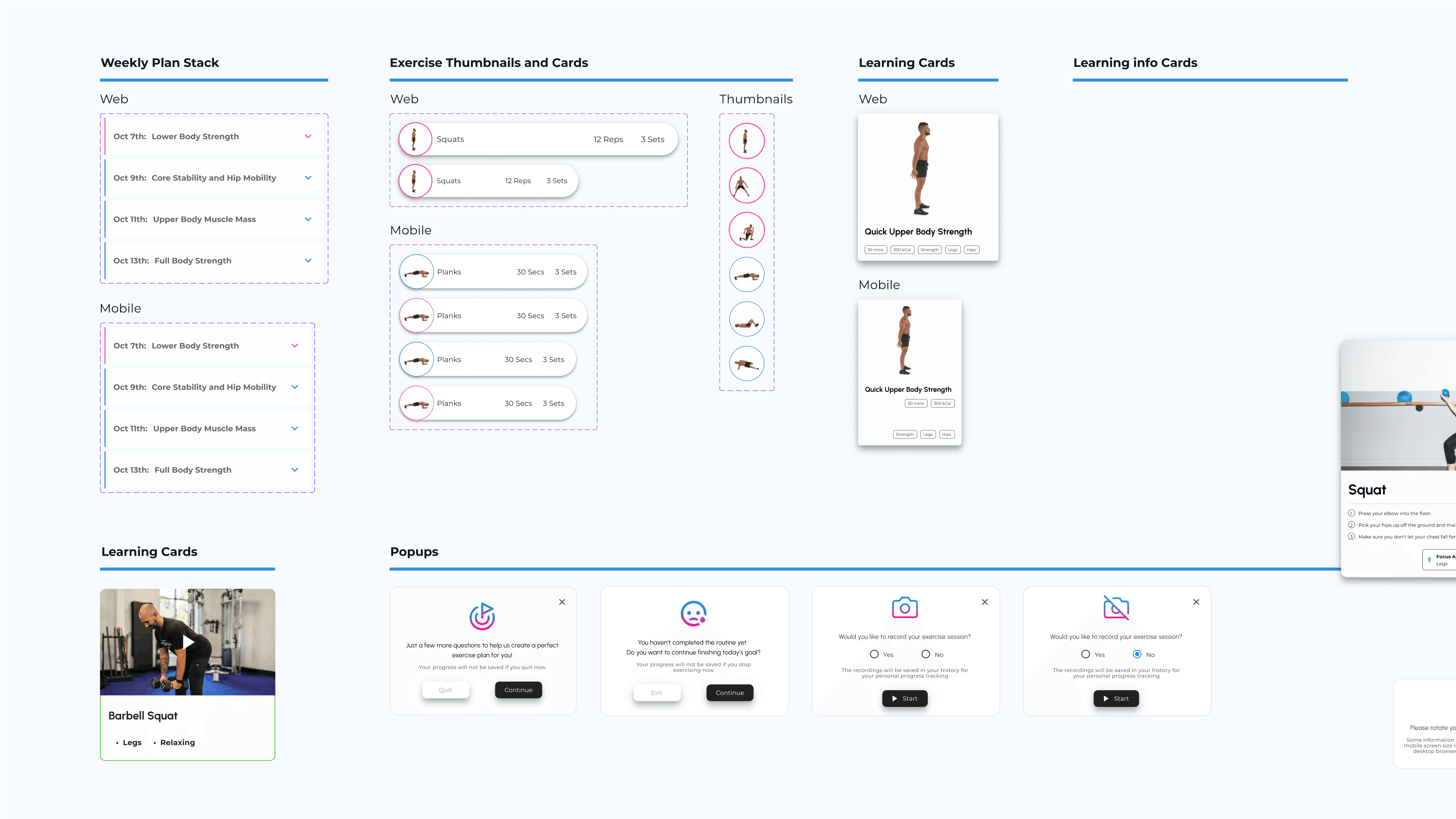
With the team mood board serving as our north star, we gradually constructed and improved our UI Kit over sprints 4-6. This helped us to maintain consistency and efficiency as we continued to improve and polish our mockups and prototypes. Although we started out with Material UI components for the low fidelity wireframes, we gradually replaced them with our own custom components that fit our product brand.
Prototype
With the team mood board serving as our north star, we gradually constructed and improved our UI Kit over sprints 4-6. This helped us to maintain consistency and efficiency as we continued to improve and polish our mockups and prototypes. Although we started out with Material UI components for the low fidelity wireframes, we gradually replaced them with our own custom components that fit our product brand.
Wireframes
We started off by using Material Design 2.0 components to build the first drafts of the lo-fi wireframes. Since the development team would be using the Material UI library to construct the live site, we believed this approach would be more efficient than to build a custom component library from scratch.
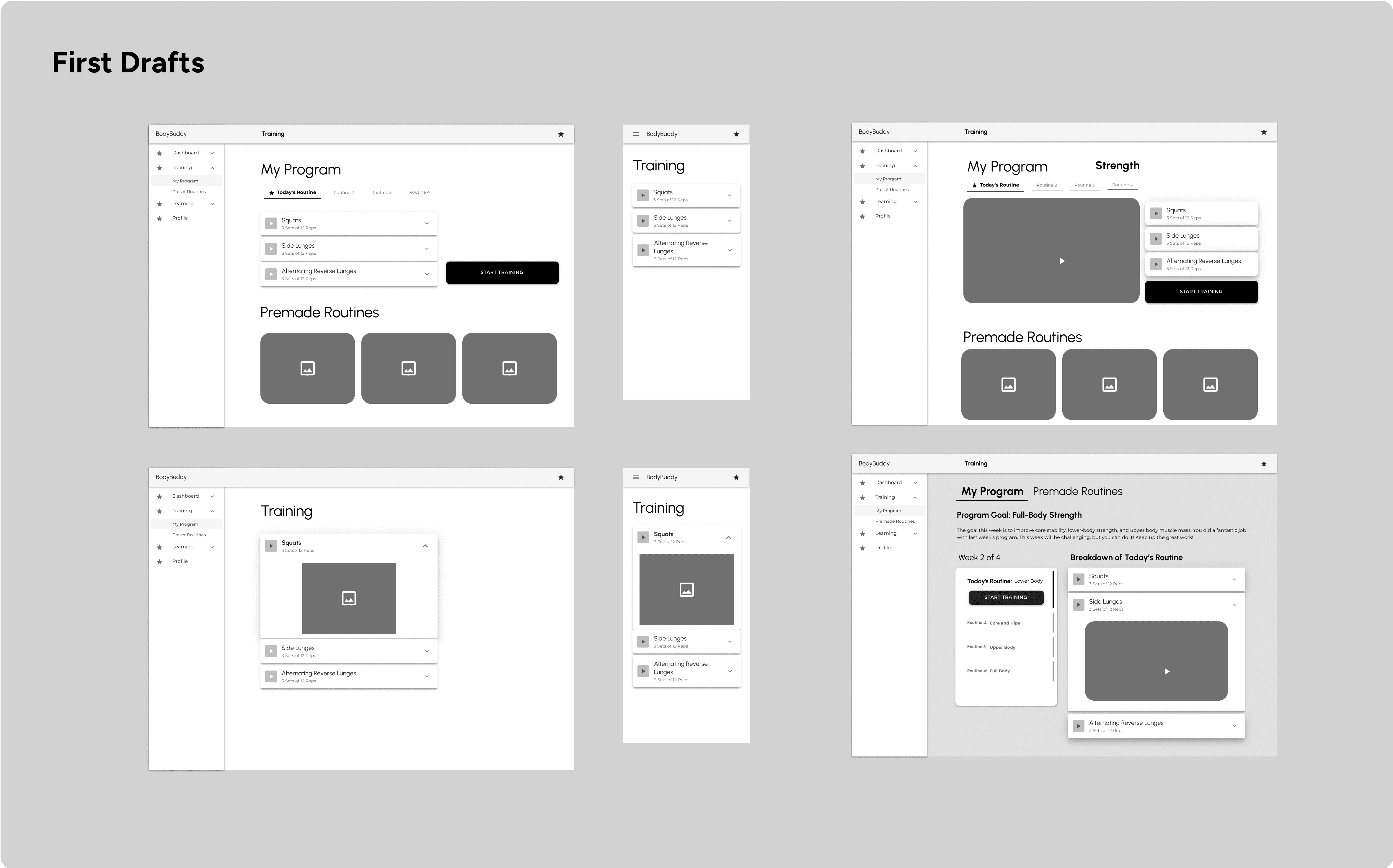
I provided two versions of the Training feature based on the construction of the user flow: One where both My Program and Premade Routines were on the same screen, and one which separated My Program and Premade Routines into separate screens via a tab element. After aligning with Viola, who was working on the Learning feature, and the dev team, who said both versions would work, we opted to go for the tab view to give the user a more immersive experience when focusing on either function.
Calendar Integration
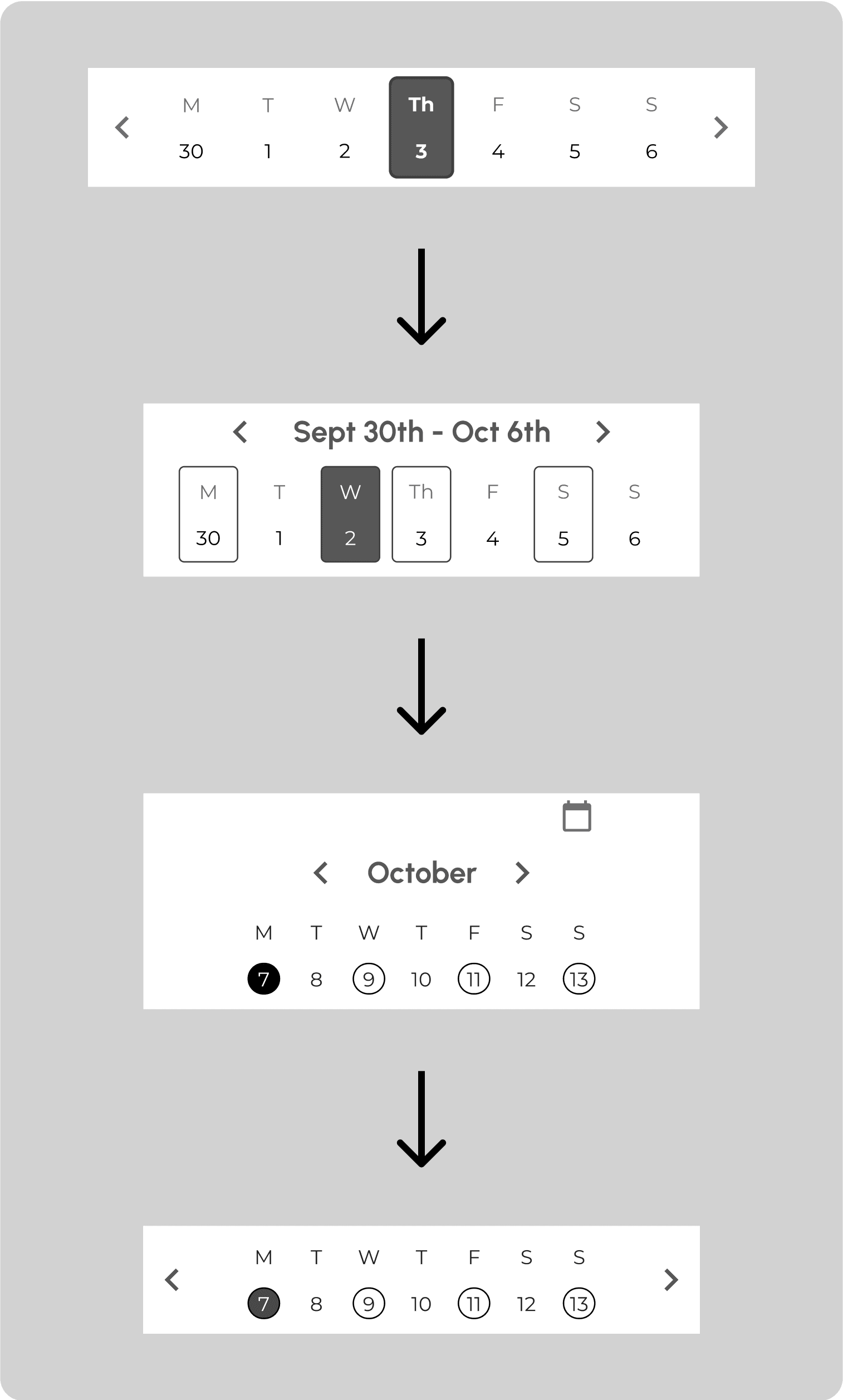
How does the user know what day it is?
In the next sprint, we realized that users would have difficulty understanding which part of the program they were at, so I created a put a calendar component and integrated it onto the UI. Some adjustments were made to make it more minimal while still retaining its main function.
Hi-Fidelity Wireframes
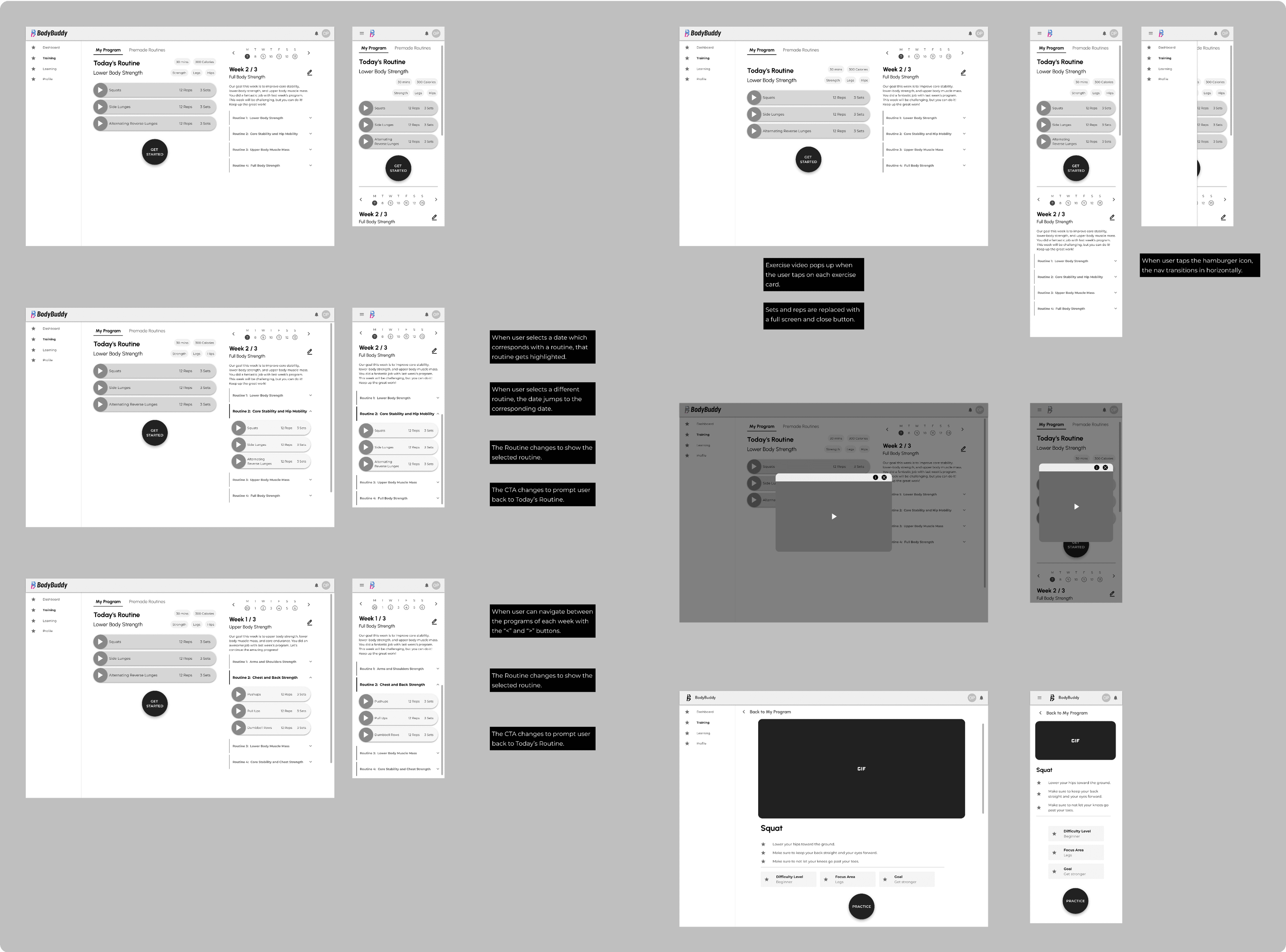
The rest of the UI was designed in alignment with the other features. The exercise cards, video player, and routine drawer component groups were reused in the History screens. The large instructional exercise card with a video player also was reused in the Learning feature. The annotations helped describe the interactions for the dev team to start implementation even before a formal handoff.
Mockups
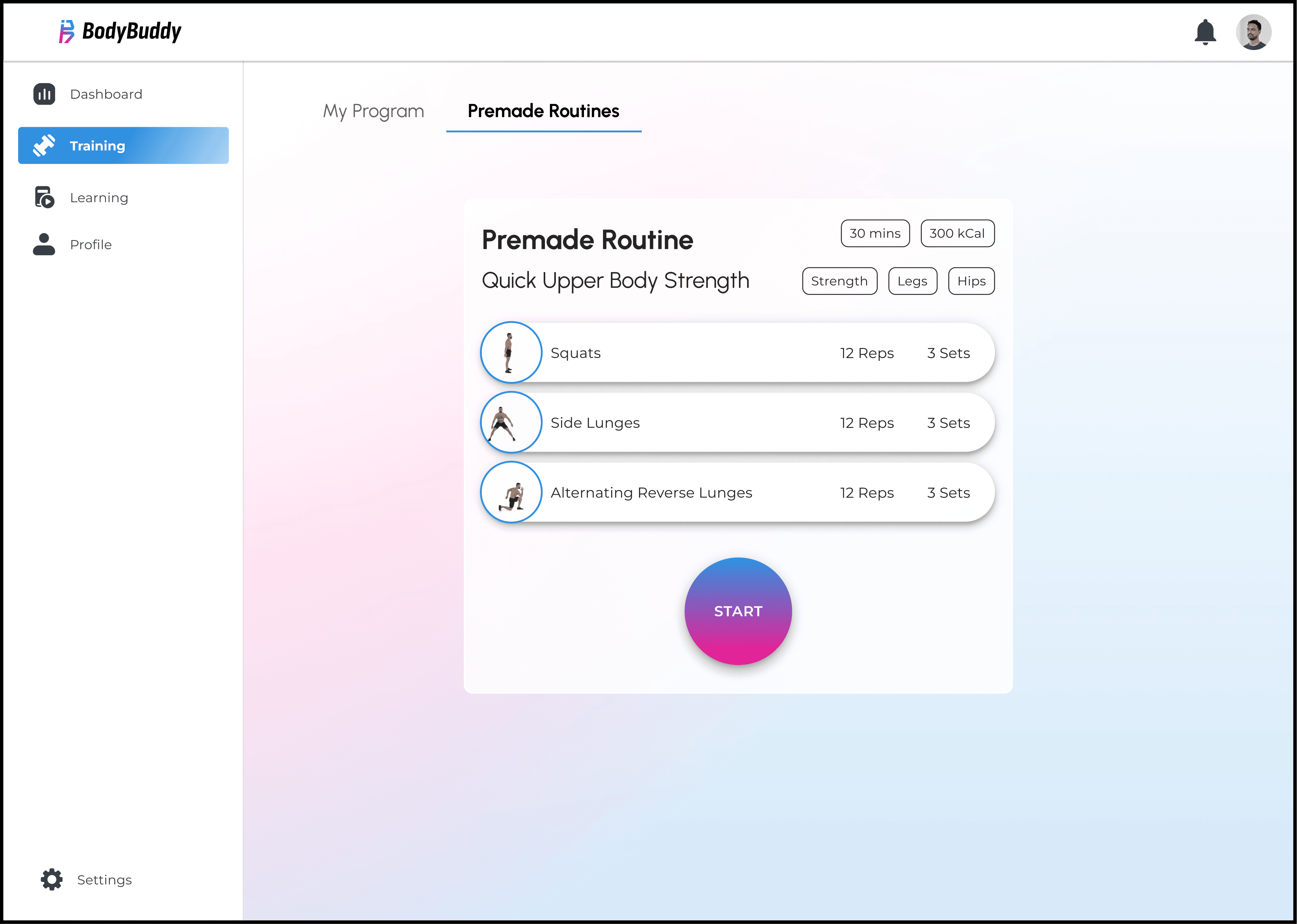
After the UX was solidified through the wireframes, the next step was to enhance the vibrance of our UI by applying the colors and styling our team established in the branding guide and UI kit. We opted to go with a glass-morphic UI design style with a subtle gradient in a background and a heavier gradient on our main CTA button. We chose a light mode UI to ensure there is enough visual contrast for users on different devices and in various levels of environmental brightness, especially during daytime.
Prototypes
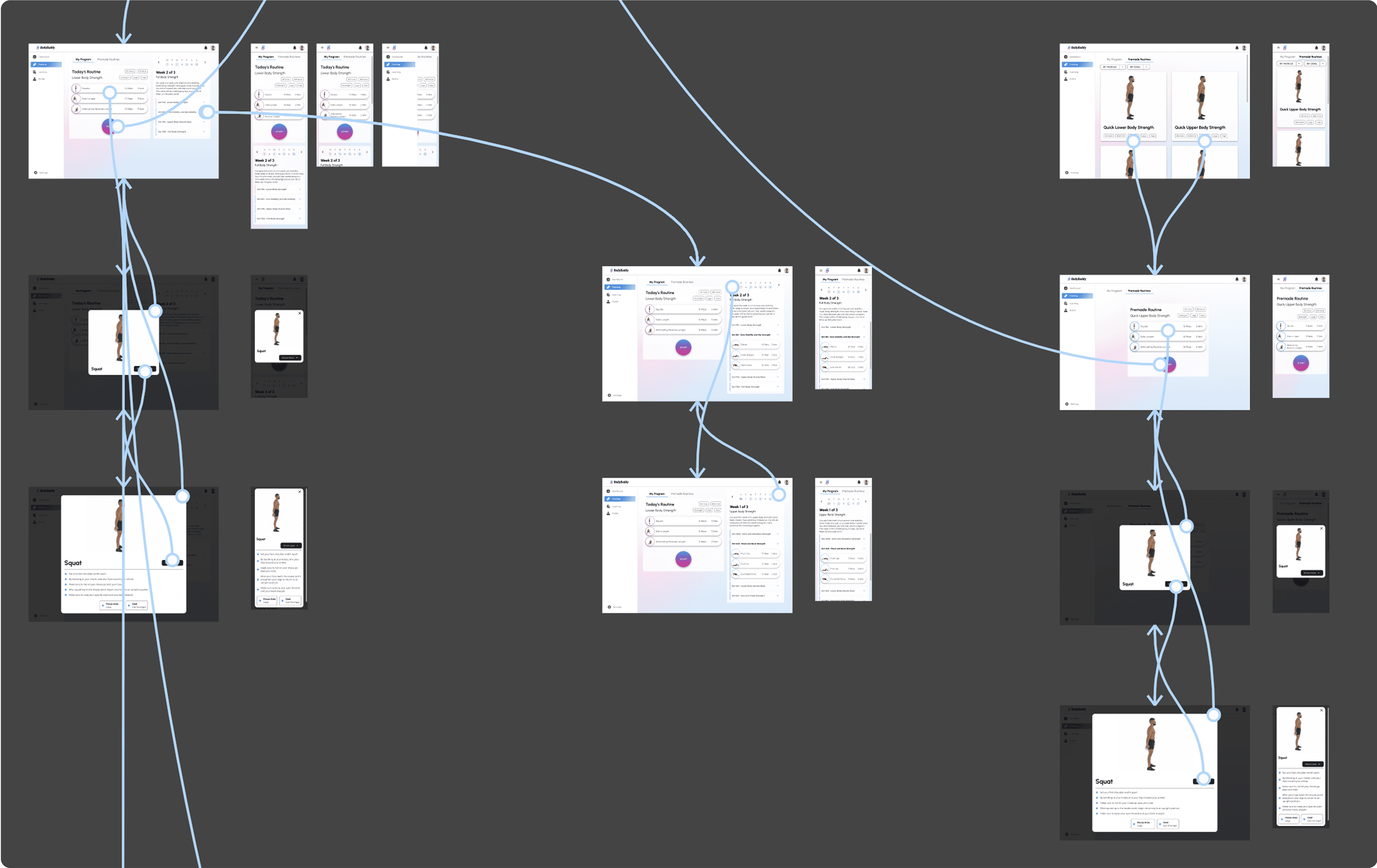
I constructed some simple prototypes for both the Training and Premade Routines interfaces. This prototyping was especially helpful for the usability testing we would conduct in the next phase of testing and adjustment.
Test
Our team conducted cognitive walkthroughs and heuristic evaluations during the initial wireframe stage, which allowed each designer to find shortcomings in their flows and improve upon them iteratively before moving on to mockup creation.
Cognitive Walkthroughs
Cognitive walkthroughs were conducted to evaluate the effectiveness of our wireframe flows. We have assigned different tasks to different team members, covering the functionality of all our features to find any loopholes in our design and ensure a smooth user experience.
The creator of each flow was assigned as the facilitator of their flow, and they were responsible for listing the tasks in the flow and including which wireframe screens were needed to complete each step. Other participants were assigned as evaluators, whose role was to go through every task, evaluate the flow as a new user, and give feedback based on four parameters: mental model, visibility, consistency, and input on the design.
Training Section Findings
The Training feature was involved in two tasks. The first task was for the user to complete a Premade Routine from start to finish. The second task was to leave Today’s Routine and save progress, and then to continue the routine towards completion.
Task one was able to be completed by all participants without issue. Task two had one minor issue for visibility and one minor issue for consistency, however, due to feedback from the dev team regarding the difficulty in storing unfinished exercise sessions in the user history, this flow was removed in further iterations.
Heuristic Evaluations
Heuristic evaluations were conducted by the design team members for the most critical user interfaces concurrently with the cognitive walkthroughs. Each of the team members would choose the main screen in their wireframe flow to conduct an evaluation based on Jakob Nielsen's 10 general principles for interaction design.
Training Section Findings - Consistency and Standards
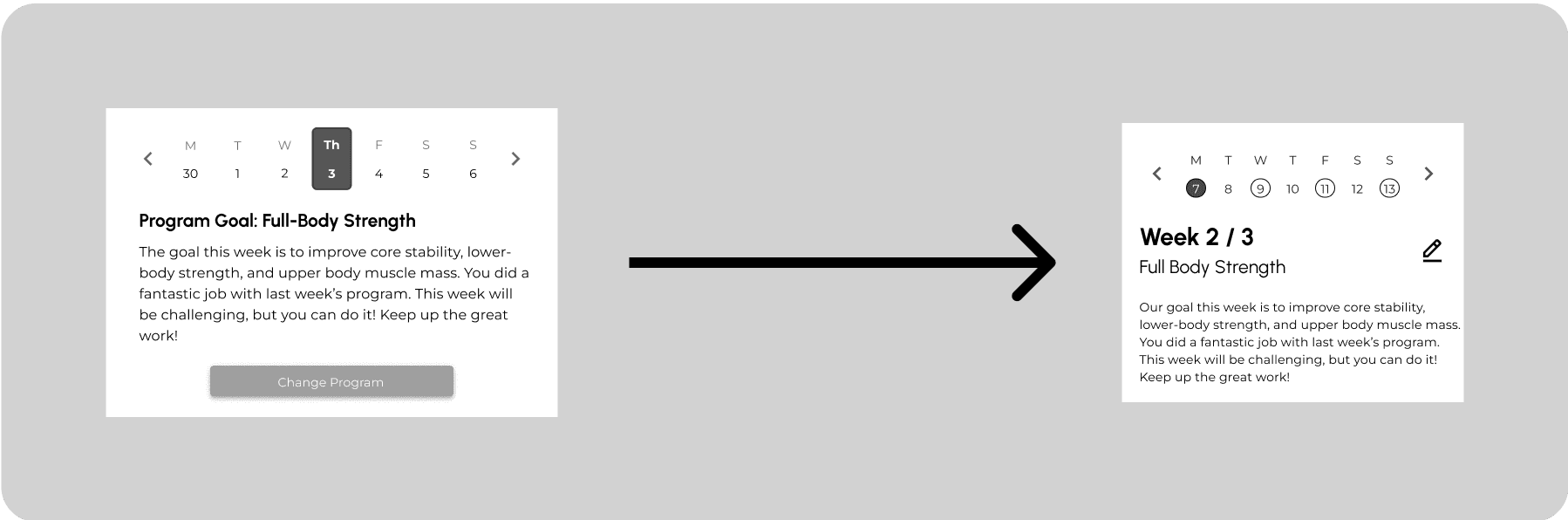
Edit Icon Consistency
Error: Inconsistent usage of icons and text for buttons.
Solution: Changed the edit program button to an icon in alignment with the Profile interface.
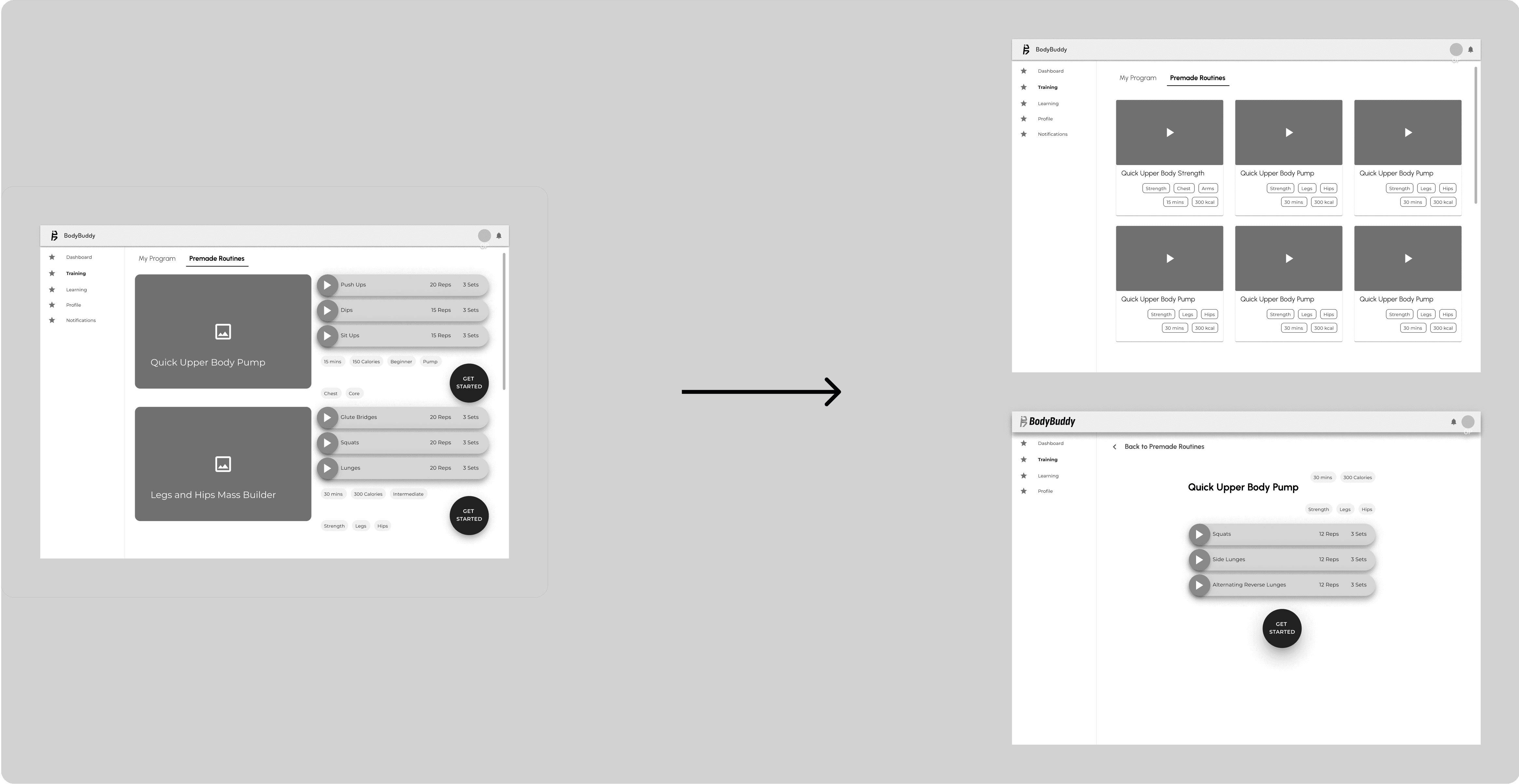
Alterations to the Premade Routines
Error: Inconsistent use of different elements, such as buttons, chips, cards.
Solution: Reused the same components for buttons, chips, and cards in alignment with the Learning feature.
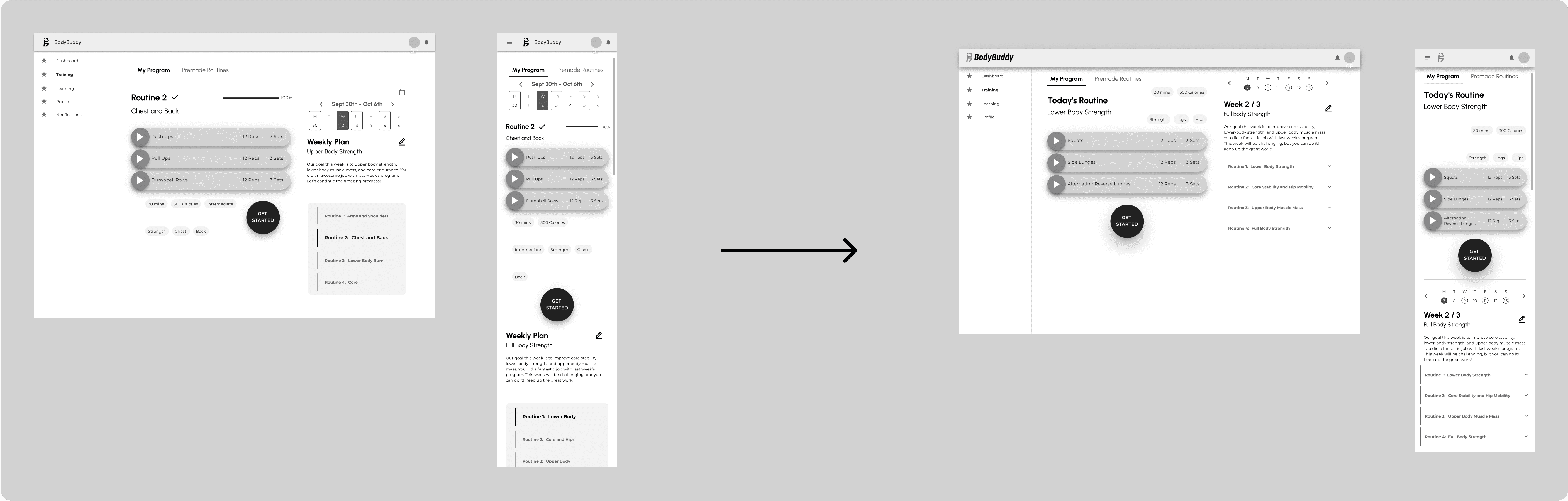
Decreased White Space
Error: Too much white space on the Training page.
Solution: Decreased the white space so that negative space was used meaningfully.

Awkward Calendar Teleportation
Error: The calendar position for My Program changes awkwardly from desktop to mobile.
Solution: Changed the position of the calendar module to remain consistent across different screen sizes.
Usability Test
The usability test helped us to evaluate the overall user experience of the BodyBuddy app by observing how users interact with key features, identifying pain points, and gathering actionable feedback to improve the app's functionality and design.
From those findings, we improved our design for an intuitive interface and create seamless user experience. However, since these usability tests were conducted after the mockups and prototypes had already been completed, these changes were reflected on the development site rather than on the design deliverables.
Training Section Findings
The training section did not have any highly critical issues.
My Program Tabs Confusion (Medium)
Error: Users were confused about the role of 2 separate tabs on the My Program page
Recommended Solution: Explore different layouts/structure for My Program using 1 single tab for users to navigate and view the program more easily.
Lack of Feedback on Exercise Completion (Low)
Error: There were no checkmarks or visual indicators to show which movements had already been completed, making it harder for users to track progress.
Solution: Include checkmarks or progress bars to indicate completed movements or exercises, providing better tracking for users.
Closing Thoughts
Working on this project was an amazing experience. Through mindful communication, effective collaboration, and dedication to the design process, our team was able to achieve something we were truly proud of.
Designing the Training feature was an interesting challenge. There weren’t a lot of text elements, but it was still important to convey the information for the user in a hierarchically logical manner, while not making it too overwhelming. Through many iterations based on valuable feedback from our instructors, I was happy with the final outcome.
Being a design lead as a very junior designer was challenging yet insightful learning experience. It took more time for me than it would a more experienced designer to gather information, delegate tasks, organize design documents and libraries to make it easier for other designer teammates. However, whatever I was lacking in experience, I tried to make up for with dedication and perseverance. I really appreciate my hardworking teammates for making this project truly an amazing experience.